Display elements
The figure below shows the display elements, status indicators, and operating functions of the device.
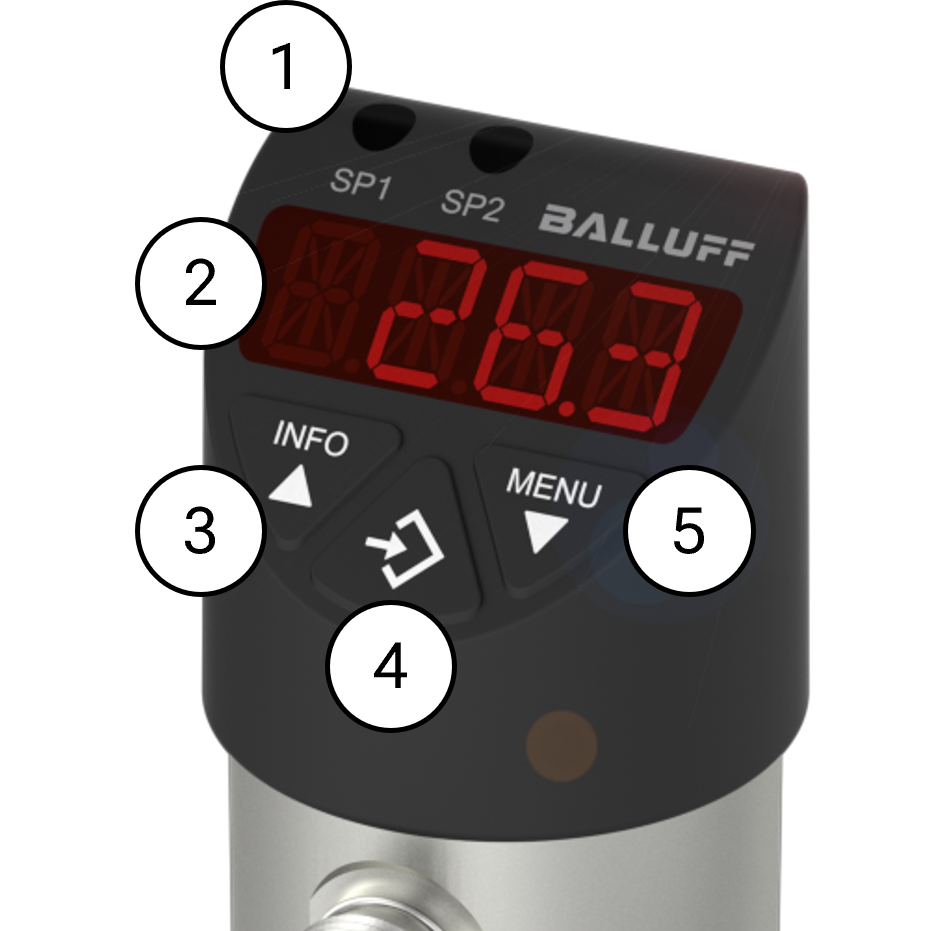
1 |
Status LED |
2 |
4-digit LED display |
3 |
INFO Button |
4 |
CONFIRMATION button |
5 |
MENU Button |
Status LED
Status of switching output 1
Status of switching output 2
4-digit LED display
Display of flow
Display of menu item
Display of parameter
INFO Button
Display mode
Short press: Display of unit
Long presse: Display of the parameters
Programming mode
Short press: Menu up, Parameter value up (step-wise)
Long press: Menu up, Parameter value up (fast)
CONFIRMATION button
Display mode
Short press: Display of unit
Programming mode
Short press: Selection of menu item, Confirmation of input
MENU Button
Display mode
Short press: Display of unit
Long presse: Jumping into the programming mode
Programming mode
Short press: Menu down, Parameter value up (step-wise)
Long press: Menu down, Parameter value up (fast)