Uncontrolled system movement
When starting up, if the sensor is part of a closed loop
system whose parameters have not yet been set, the
system may perform uncontrolled movements. This could
result in personal injury and equipment damage.
Please mind the following safety instructions:
Persons must keep away from the system’s hazardous zones.
Startup must be performed only by trained technical personnel.
Observe the safety instructions of the equipment or system manufacturer.
To start up the system, proceed as follows:
Check connections for tightness and correct polarity.
Replace damaged connections.
Turn on the system.
Check measured values and adjustable parameters
Operation
Operation modes
Mode
Description
System start
Digital display is fully activated for 1 s.
When the pressure switch powers up within the hysteresis range, the output switch is set to “not active” by default.
Programming mode (setting the parameters)
Activating the programming mode
Keep the “MENU” button pressed for approx. 2 s. If a password ≠ 0000 is set, a password is requested; on successful authentication the instrument enters programming mode, otherwise it reverts to display mode.
Timeout
If no button is pressed for 60 s while setting a parameter, the instrument returns to display mode and the value remains unchanged.
Display mode (normal operation, display of pressure value)
Returning to display mode
Simultaneous pressing of “INFO” and “MENU”.
Overview of parameters
Overview of parameters
Menu item
Description
Parameter
Factory setting
SP1 / SP2
Hysteresis function: Switch point (switching output 1/2)
0.25 … 100 % of measuring range
Nominal pressure
FH1 / FH2
Window function: Window high (switching output 1/2)
0.25 … 100 % of measuring range
Nominal pressure
RP1 / RP2
Hysteresis function: Reset point (switching output 1/2)
Switching delay time before any electrical signal change occurs (for SP1, SP2)
0.00 … 65.00 s
0.00 s
DR1 / DR2
Reset delay time before any electrical signal change occurs (for RP1, RP2)
0.00 … 65.00 s
0.00 s
OU1 / OU2
Switching function (switching output 1/2)
HNO / HNC / FNO / FNC
HNO
OU3
Output signal (analogue)
I = 4 … 20 mA
U = DC 0 … 10 V
I
POL1 / POL2
Switching logic (switching output 1/2)
PNP / NPN
PNP
ALOW
Measuring range scaling / turndown (analogue start value)
corresponding to analogue output
Start of measuring range
AHGH
Measuring range scaling / turndown (analogue end value)
corresponding to analogue output
End of measuring range
AVGD
Damping (digital display)
0.00 … 65.00 s
0.20 s
AVG1 / AVG2
Damping (switching output 1/2)
0.00 … 65.00 s
0.00 s
AVG3
Damping (analogue signal)
0.00 … 65.00 s
0.00 s
UNIT
Unit switching
BAR, mBAR, MPa, kPa, PSI, kg/cm², %
Order-related
0SET
Adjustability of the zero point / execution of “Autozero” (max. ±3 % of span)
Yes / No
DISM
Display value in display mode
ACT = current system pressure
LOW/HIGH = min/max system pressure
OFF = display off
SP1/FH1 / RP1/FL1 / SP2/FH2 / RP2/FL2 = set switching value
ACT
DISU
Refresh rate (digital display)
1, 2, 5, 10 updates/second
5
DISR
Rotate the indication by 180° (digital display)
Yes / No
DRES
Resolution (digital display)
OPT = optimised (stable display with rounding)
FULL = maximum (finest resolution; may require damping)
OPT
RHL
Clear memory (min/max system pressure)
Yes / No
PAS
Password entry
0000 = no password; password input digit by digit
0000
TAG
Measuring instrument name (TAG)
Up to 32 characters (A–Z; 0–9; -; SPACE). Two consecutive spaces terminate input and remove trailing characters.
Without
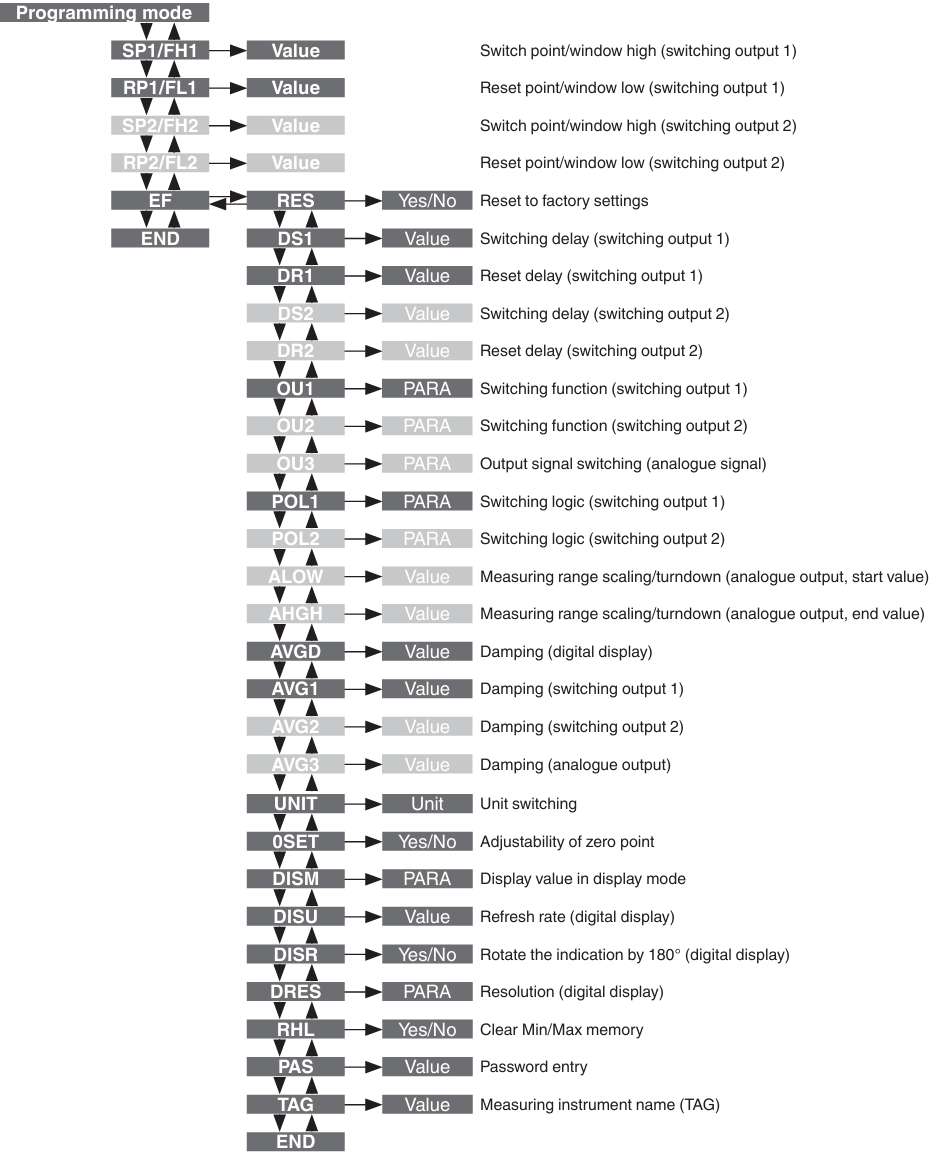
Menu tree
Certain menu items (light grey) are only displayed if the pressure switch features the respective option
Operating notes
Regularly check function of the sensor and all associated components.
Regularly check for available firmware and security updates.
Regularly review user accounts, access permissions and security-related settings.
Take the sensor out of operation whenever there is a malfunction.
Secure the system against unauthorized use.
Check fasteners and retighten if needed.
Cleaning
Only use commercially available and solvent-free cleaning agents.
Before cleaning, correctly disconnect the instrument from the pressure supply,
switch it off and disconnect it from the mains, if needed.
Do not use sharp objects or aggressive detergents to clean in order to avoid
damage to the sensitive and extremely thin diaphragm and to the wetted surface
of the instrument (when disassembled for calibration etc.) Clean the outside of
the instrument with a moist cloth or if cleaning from outside (“wash down”)
permitted, observe the permissible temperature and ingress protection.
Electrical connections, if available, must not come into contact with moisture.
Wash or clean the dismounted instrument before returning it, in order to protect
personnel and the environment from exposure to residual media. Residual media in
dismounted instruments can result into a risk to persons, the environment and
equipment. Sufficient precautionary measures must be taken.