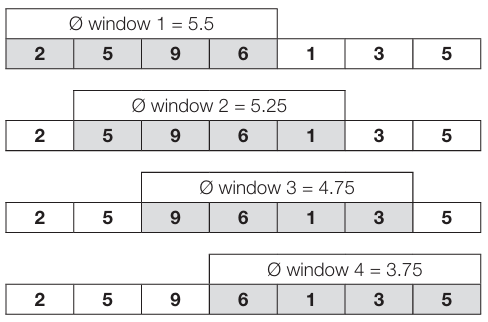
The analog input values can be filtered with the function Moving Window Averaging. The last 1…16 values are taken into account for the average and the calculated average is displayed in the process data. Value 1 means no averaging, the measured data are output in the process data without further processing.
Moving window averaging
ISDU
Moving window average – ISDU
Name
Index
Subindex
Access
Length
Data Type
Data Storage
Default
Length of Moving Window Average
0xFB (251)
0
R/W
4 Byte
Yes
Length of Moving Window Average Port x
1…4
R/W
1 Byte
UINT8
No
0x08
Length of Moving Window Average
Moving Window Average – Length of Moving Window Average (Index)
Value
Meaning
0x01 (1)
No averaging. After the measurement, the data is inserted into the process data.
0x02…0x10 (2…16)
The average value, which is transferred to the process data, is generated from the last 2…16 measurements.
Moving Window Average – Length of Moving Window Average (Subindex)
Subindex
Meaning
1
Length of moving window average for Port 5
2
Length of moving window average for Port 6
3
Length of moving window average for Port 7
4
Length of moving window average for Port 8
System Commands
Moving Window Average – System Commands
Command Value
Device Action
0x81 (129)
Application Reset – Resets writable parameters to the default value.
0x82 (130)
Reset Factory Settings – Resets writable parameters to the default value.