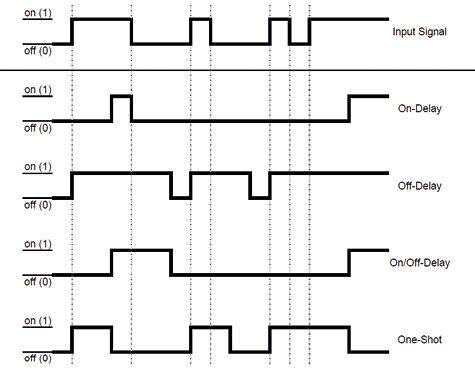
This is a function that is applied to an internal binary signal. This function allows the user to apply time delay functions to the internal binary signal of the device (On-Delay, Off- Delay, One-Shot or On/Off-Delay).
Mathematics/Algorithm
Process Data
Signal delay – process data
Object ID
Name
Description
Direction
0x0008 (8)
Signal Delay Channel 1
Output signal Signal Delay Channel 1
Input
0x0009 (9)
Signal Delay Channel 2
Output signal Signal Delay Channel 2
Input
0x000A (10)
Signal Delay Channel 3
Output signal Signal Delay Channel 3
Input
0x000B (11)
Signal Delay Channel 4
Output signal Signal Delay Channel 4
Input
ISDU
Signal delay – ISDU
Name
Index
Subindex
Access
Length
Data Type
Data Storage
Default
Signal Delay Input
0x0096 (150)
0
R/W
8 bytes
Yes
Channel 1
1
R/W
2 bytes
UINT16(ENUM)
No
0
Channel 2
2
R/W
2 bytes
UINT16(ENUM)
No
0
Channel 3
3
R/W
2 bytes
UINT16(ENUM)
No
0
Channel 4
4
R/W
2 bytes
UINT16(ENUM)
No
0
Signal Delay Mode
0x0097 (151)
0
R/W
4 bytes
Yes
Channel 1
1
R/W
1 byte
UINT8(ENUM)
No
0
Channel 2
2
R/W
1 byte
UINT8(ENUM)
No
0
Channel 3
3
R/W
1 byte
UINT8(ENUM)
No
0
Channel 4
4
R/W
1 byte
UINT8(ENUM)
No
0
Signal Delay On-Delay
0x0098 (152)
0
R/W
8 bytes
Yes
Channel 1
1
R/W
2 bytes
UINT16
No
0
Channel 2
2
R/W
2 bytes
UINT16
No
0
Channel 3
3
R/W
2 bytes
UINT16
No
0
Channel 4
4
R/W
2 bytes
UINT16
No
0
Signal Delay Off-Delay / One-Shot
0x0099 (153)
0
R/W
8 bytes
Yes
Channel 1
1
R/W
2 bytes
UINT16
No
0
Channel 2
2
R/W
2 bytes
UINT16
No
0
Channel 3
3
R/W
2 bytes
UINT16
No
0
Channel 4
4
R/W
2 bytes
UINT16
No
0
Signal Delay Status
0x009A (154)
0
R
4 bytes
n/a
Channel 1
1
R
1 byte
UINT8(ENUM)
n/a
–
Channel 2
2
R
1 byte
UINT8(ENUM)
n/a
–
Channel 3
3
R
1 byte
UINT8(ENUM)
n/a
–
Channel 4
4
R
1 byte
UINT8(ENUM)
n/a
–
Signal Delay Input Parameter
With Signal Delay Input, the internal binary signal source can be selected. Input contains a list of the internal binary signals.
Signal Delay Mode Parameter
With Signal Delay Mode, the current mode of the signal delay function can be selected.
Signal Delay – Signal Delay Mode
Value
Meaning
Description
0x00 (0)
Deactivated
Deactivated
0x01 (1)
Delay
On, Off and On-/Off delay function
0x02 (2)
One-Shot
One-Shot function
Signal Delay On-Delay Parameter
With Signal Delay On-Delay, the time for On-Delay can be set. The value represents the time in milliseconds. The value range is between 0x0000 (0) and 0xFFFF (65535). A value of 0x0000 (0) represents no delay. The parameter has no effect in One-Shot-Modus.
Signal Delay Off-Delay / One-Shot Parameter
With Signal Delay Off-Delay / One-Shot, the time for Off-Delay and One-Shot can be set. The value represents the time in milliseconds. The value range is between 0x0000 (0) and 0xFFFF (65535). A value of 0x0000 (0) represents no delay.
Signal Delay Status Parameter
With Signal Delay Status, the current status of each channel can be read.
Signal Delay – Signal Delay Status
Value
Meaning
Description
0x00 (0)
Off
Output signal of Signal Delay = 0/FALSE
0x01 (1)
On
Output signal of Signal Delay = 1/TRUE
0x02 (2)
On-Delay
Output signal of Signal Delay = 0/FALSE and On-Delay currently running.
0x03 (3)
Off-Delay
Output signal of Signal Delay = 1/TRUE and OFF-Delay currently running.
0x07 (7)
One-Shot
Output signal of Signal Delay = 1/TRUE and One-Shot function currently running.
0xFF (255)
Deactivated
Feature is deactivated.
System Commands
Signal delay – System Commands
Command Value
Device Action
0x81 (129)
Application Reset – Resets writable parameters to the default value.
0x82 (130)
Restore Factory Settings – Resets writable parameters to the default value.