Image-to-Object Mapping#
In production environments with moving target objects, especially on conveyor belts with many consecutive products, it is essential to assign each image captured by the RadarImager to the correct physical object. The RadarImager supports this by transmitting metadata together with every image in the GenICam Generic Data Container (GenDC).
Metadata transmitted with each image#
The following metadata is transmitted for each image in the GenDC container:
MeasurementIDFrameIDTimestampEpoch(seconds + microseconds)TimestampDuration(microseconds)
MeasurementID#
Each newly recorded measurement created by a trigger event receives a unique consecutive MeasurementID.
The identifier remains unique over practical operating times because it uses a 64-bit unsigned integer.
In production, it is important to monitor this ID for continuity:
- Missing values will indicate dropped measurements.
- Repeated values can indicate that the same recorded dataset was recalculated and transmitted again, for example after a parameter update.
Important
Monitoring MeasurementID is essential, but it does not detect every possible trigger-related issue.
If a trigger event is missed completely because of poor trigger signal quality or other trigger errors,
an object can be missed without a clearly visible inconsistency in the sequence of received image MeasurementIDs.
An additional validation with the provided Timestamps is recommended.
FrameID#
FrameID is a unique consecutive identifier for every image (stack) calculated and transmitted by the RadarImager.
It therefore reflects the sequence of transmitted images.
Depending on how quickly parameters are changed and how much computational load the current configuration creates,
fast configuration updates can also lead to dropped frames. In this situation, occasional missing FrameID values are usually less critical,
because the main goal is to provide an image with the latest configuration as quickly as possible.
By contrast, missing MeasurementID values are highly relevant in production and should be investigated.
Refer to Configuration limitations for background.
Relationship between FrameID and MeasurementID#
In stable operation without recalculations, FrameID and MeasurementID are usually increasing identically.
However, after parameter updates, the latest recorded measurement may be recalculated and transmitted again with the updated configuration.
In that case, the dataset keeps its MeasurementID, while each newly transmitted image still receives its own new FrameID.
As a result, FrameID can become greater than MeasurementID.
If FrameID is observed to be smaller than MeasurementID in the received stream, this indicates dropped frames and strongly suggests that the system is exceeding configuration limitations.
TimestampEpoch#
TimestampEpoch stores the absolute trigger time as seconds since epoch plus the remaining microseconds.
This timestamp is captured when the trigger event occurs.
It is based on the RadarImager system time. The system time can be read and configured through the Settings API.
Offset is not included
The configured offsetDistanceX is not considered in TimestampEpoch.
The timestamp always refers to the trigger event itself.
TimestampDuration#
TimestampDuration measures the time from the trigger event until the start of image data transmission in microseconds.
This means it represents the internal time needed for:
- data acquisition
- image processing
This duration is useful to estimate how long ago the image was recorded. However, it does not include the transfer time over the GenICam interface to the client.
If the conveyor speed is known, the displacement of the object until transmission starts can be calculated as:
distance[mm] = conveyorSpeed[mm/s] × TimestampDuration[µs] / 1,000,000
when conveyorSpeed is given in mm/s and TimestampDuration in µs.
Example on a conveyor belt#
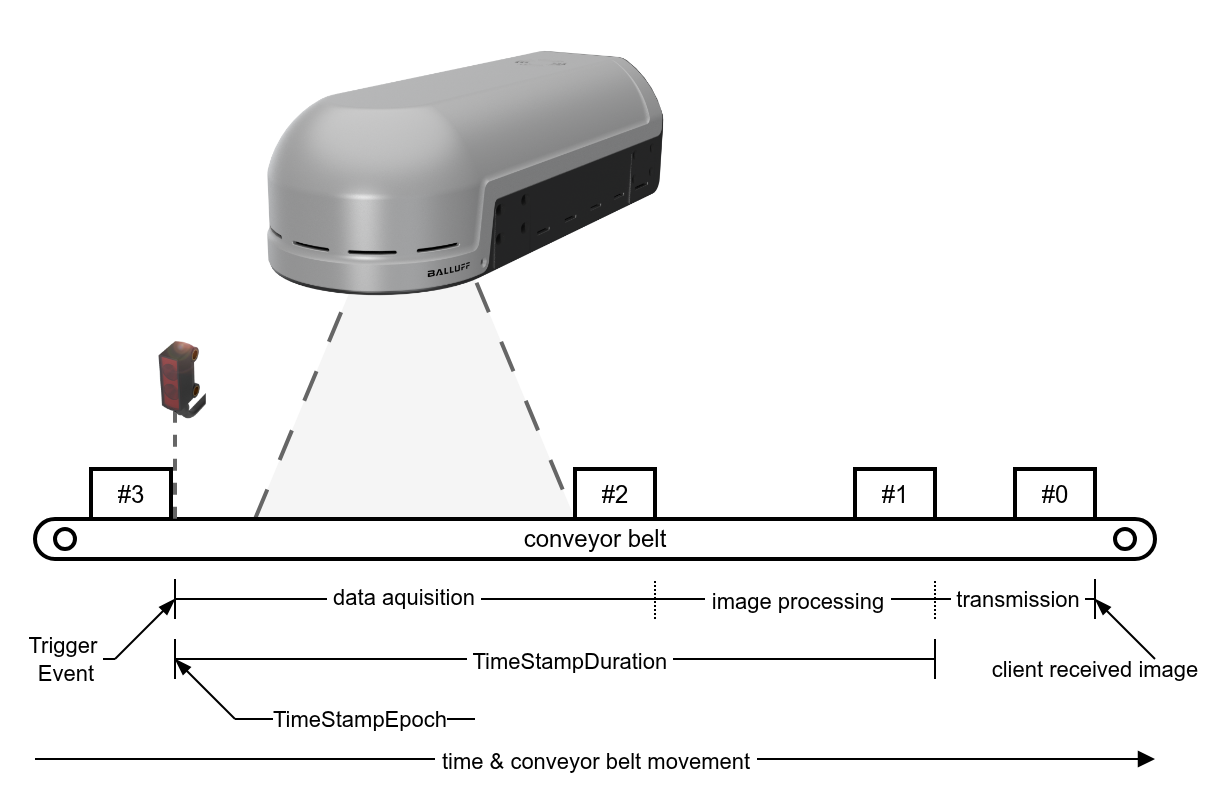
The image above shows objects passing the RadarImager on a conveyor belt.
Each object is associated with its own MeasurementID.
In this example, the trigger sensor is mounted before the active radar area of the RadarImager.
- The object with
MeasurementID 3activates the trigger sensor. At this moment,TimestampEpochis stored based on the current system time, and the measurement ofTimestampDurationbegins. - Data acquisition starts when the object enters the active radar area.
- Once the object has completely passed the active radar area, acquisition for this object is finished and image processing starts.
- As illustrated by the object with
MeasurementID 1,TimestampDurationends when image processing is finished and transmission to the client can begin. Using the conveyor speed, the client can later reconstruct this position fromTimestampDuration. - After data transmission is completed, as illustrated by the object with
MeasurementID 0, the client can perform the final image-to-object assignment and continue with further evaluation.
Depending on the selected configuration, the transmission time should usually represent only a small part of the total latency compared to acquisition and processing.
Possible strategies for image-to-object mapping#
A. Count objects and track MeasurementID#
One possible approach is to count the objects passing the RadarImager and match them to the received MeasurementID values.
This can work well when there are large gaps between consecutive objects.
However, this approach has a higher risk that a single error creates a permanent offset in the assignment. Without an additional correction mechanism, this offset can remain undetected for a long time.
Even if a different primary strategy is used, MeasurementID continuity should always be monitored to detect:
- missing measurements
- repeated recalculations of the same dataset
- unexpected behavior during operation
B. Use TimestampDuration and known conveyor speed#
If the conveyor speed is known, TimestampDuration can be used to calculate how far a target object has moved
between the trigger event and the start of image transmission.
This makes it possible to reconstruct the object's position after data acquisition and image processing.
The remaining transfer time from the RadarImager to the host computer is not included in TimestampDuration,
but it can often be estimated with reasonable accuracy from the transferred image size and the available network bandwidth.
With a Gigabit Ethernet connection, this usually provides a sufficiently accurate estimate of the object position at the moment the image is received, allowing reliable image-to-object assignment with a relatively small tolerance.
C. Use TimestampEpoch and synchronized system time#
If the conveyor speed is known and the RadarImager system time is known and ideally synchronized with the host system,
TimestampEpoch enables the most precise time-based image-to-object mapping.
In this case, the elapsed time from the trigger event to any later point in time can be calculated directly, for example to the time when the image is received or processed by the host application. This allows the client to determine the current or past object position very precisely.
Recommended for production
In production systems, the most robust approach is usually to combine multiple indicators:
- use
MeasurementIDto monitor continuity, - use
FrameIDto detect recalculations caused by parameter changes, - and use
TimestampEpochorTimestampDurationtogether with conveyor speed for the actual spatial assignment.