Installation and connection
Installation
Product dimensions are provided in chapter Product description. Several mounting options are available for the SmartLight. The most common mounting methods are flush mounting, wall mounting, and stand mounting.
Note
Mounting accessories can be found on the product page at Balluff Product Page under the accessory section.
The mounting hardware included with the product is intended for flush mounting only. Wall mounting and stand mounting require additional accessories, which must be ordered separately.
Flush Mount
For flush mounting the product on a surface, a mounting hole with a diameter of 20 mm is recommended.
Place the rubber washer onto the designated threaded section of the product and insert the threaded section through the mounting hole.
Secure the product using the supplied M18 hex nut.
Tighten the M18 hex nut with a torque of 8 Nm.
Optionally, a standard machine washer may be used. In applications subject to heavy vibration, the use of a thread-locking compound is recommended.
Stand Mount
Two mounting options are available for stand installations. When using existing Silver Line stands, such as BAM026K, the additional adapter plate BAM04P6 must be ordered separately. Black Line stands can be mounted directly without requiring this additional accessory.
Mount the adapter plate to the product as described in Flush Mount.
Mount the stand according to the corresponding accessory manual.
Wall Mount
Install the wall mounting accessory according to the corresponding accessory manual.
Mount the product to the wall mount as described in Flush Mount.
Electrical connection
Power supply
Notice
Unwanted voltage dips
Make sure that the power supply of the device is sufficiently dimensioned to cover start-up and peak currents and design the fuse protection concept accordingly.
Notice
Loss of function and property damage
Improper installation, e.g. due to misconnection or incorrect polarity of the connections, can result in a loss of the function and property damage.
Take measures to prevent misconnection or polarity reversal.
Prevent tampering at the connections.
Never exceed the value of 36 V between any of the pins.
Note
Open wires are not permitted when operating the product in SIO/Digital Mode.
Unconnected wires create undefined signal levels that may lead to incorrect input state detection. As a result, unintended operation or unexpected output signals may occur.
To ensure reliable operation, all input pins shall be connected to a defined potential (HIGH or LOW ) and shall not be left floating.
Note
For UL: observe cable requirements and power supply requirements (see Underwriters Laboratories (UL)).
The supply voltage for the module is provided via the IO-Link interface from the higher-level IO-Link master.
IO-Link interface
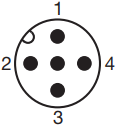
PIN |
Function IO-Link mode |
Function IO-Link with extension port mode |
Function SIO mode |
|---|---|---|---|
1 |
US - Supply voltage for the module |
US - Supply voltage for the module |
US - Supply voltage for the module |
2 |
n.c. [1] |
C/Q for the secondary device |
Digital Input 1 |
3 |
GND, reference potential |
GND, reference potential |
GND, reference potential |
4 |
C/Q (from master device) |
C/Q (from master device) |
Digital Input 2 |
5 |
n.c. [1] |
n.c. [1] |
Digital Input 3 |
Cable routing
The connection to the higher-level IO-Link master or programmable controller is made with a standard sensor cable. Depending on the selected operating mode, the cable must have 3, 4 or 5 wires.
Cable length
The connection cable may be max. 20 meters long in case of IO-Link mode and SIO mode. Additional max. 20 m cable may be there between the primary device and secondary device in case of Extension port mode.